There’s a particular kind of question that no single search can answer. “What are our three biggest competitors saying about sustainability this quarter, and how does that compare to what we’re doing?” “What’s the state of the art in our industry for onboarding new engineers, and what could we borrow from it?” “Given the client’s priorities from last week’s emails, our product roadmap, and what’s happening in the market, what should I include in next Tuesday’s pitch?”
Questions like these don’t have one answer sitting on one page. They require gathering information from multiple places, cross-referencing what you find, and pulling the threads together into something useful. Traditionally, that’s hours of work — opening tabs, copying into documents, and hoping you don’t miss anything important.
Research mode is Claude’s way of taking that kind of work on directly. It’s an agentic investigation feature that conducts multiple searches in sequence, follows what it finds, and produces a single, cited report you can actually use. This post walks through what Research is, how it works, and when it’s the right tool for the job.
What Research Actually Is
To understand Research, it helps to contrast it with how most AI search tools work. A typical search feature takes your question, runs one query, and hands you what it found. That works well for simple, single-fact questions — “what’s the population of Paris?” — but falls short when your question is layered or open-ended.
Research takes a different approach. According to Anthropic’s documentation, Claude operates agentically, conducting multiple searches that build on each other while determining exactly what to investigate next. It explores different angles of your question automatically and works through open questions systematically.
That phrase — agentic — is worth pausing on. In AI, an agent is a system that can take a goal and figure out how to pursue it on its own: deciding what to do next, adjusting based on what it finds, and continuing until the goal is met. Instead of answering your question with the first search result, Research treats your question as a starting point. Claude looks at what it finds, identifies what’s missing or worth exploring further, runs additional searches, follows leads, and continues until it has enough material to give you a thorough answer.
The result is something closer to what a thoughtful researcher would produce if you gave them a few hours: a synthesized response that pulls from multiple sources, addresses different angles of your question, and — importantly — includes citations so you can verify every claim. With Research, Claude delivers thorough answers in minutes, complete with easy-to-check citations so you can trust Claude’s findings.
When to Reach for Research
Research isn’t the right tool for every question, and knowing when to use it — versus other Claude features like web search or extended thinking — is part of getting good value from it.
Anthropic’s guidance is clear: Research is optimal for comprehensive information gathering requiring five or more tool calls over 1-3 minutes, creating in-depth reports by synthesizing information from multiple sources across the web and your integrations. In plain terms: if your question would require you to open several tabs, consult multiple sources, and stitch the findings together, Research is the right tool.
Typical examples where Research shines:
A comprehensive report that pulls from multiple sources — for example, a competitive analysis of how three vendors are positioning themselves, or a briefing on the current state of a fast-moving policy area. A blended investigation that combines what’s in your connected tools with what’s on the web — for example, summarizing internal pricing discussions from Gmail and Drive and comparing that to how competitors price publicly. An end-to-end comparison, like evaluating vendors against a defined set of criteria, where you need consistent information across each option. Anything that would take you an hour or more to do by hand.
On the other hand, Research is overkill — and sometimes slower — for simpler tasks. Extended thinking on its own is best if you don’t want to search the web or use integrations, but just want Claude to think harder about your query to figure out the answer. And for quick fact-checks or single-source lookups, ordinary web search is faster and uses less of your conversational capacity. A useful rule of thumb: if the answer probably lives in one place, use web search; if the work is in the thinking rather than the looking, use extended thinking; if the answer requires gathering and synthesizing from many places, use Research.
How Research Works Under the Hood
When you ask a question with Research enabled, a few things happen in sequence.
First, Claude plans its approach. Research and extended thinking work best together, and by default when you enable Research it automatically enables extended thinking. Combining extended thinking with Research allows Claude to both plan its approach thoughtfully and execute comprehensive information gathering. This planning step is where Claude decides what angles to investigate, what order to tackle them in, and what sources are likely to be most useful.
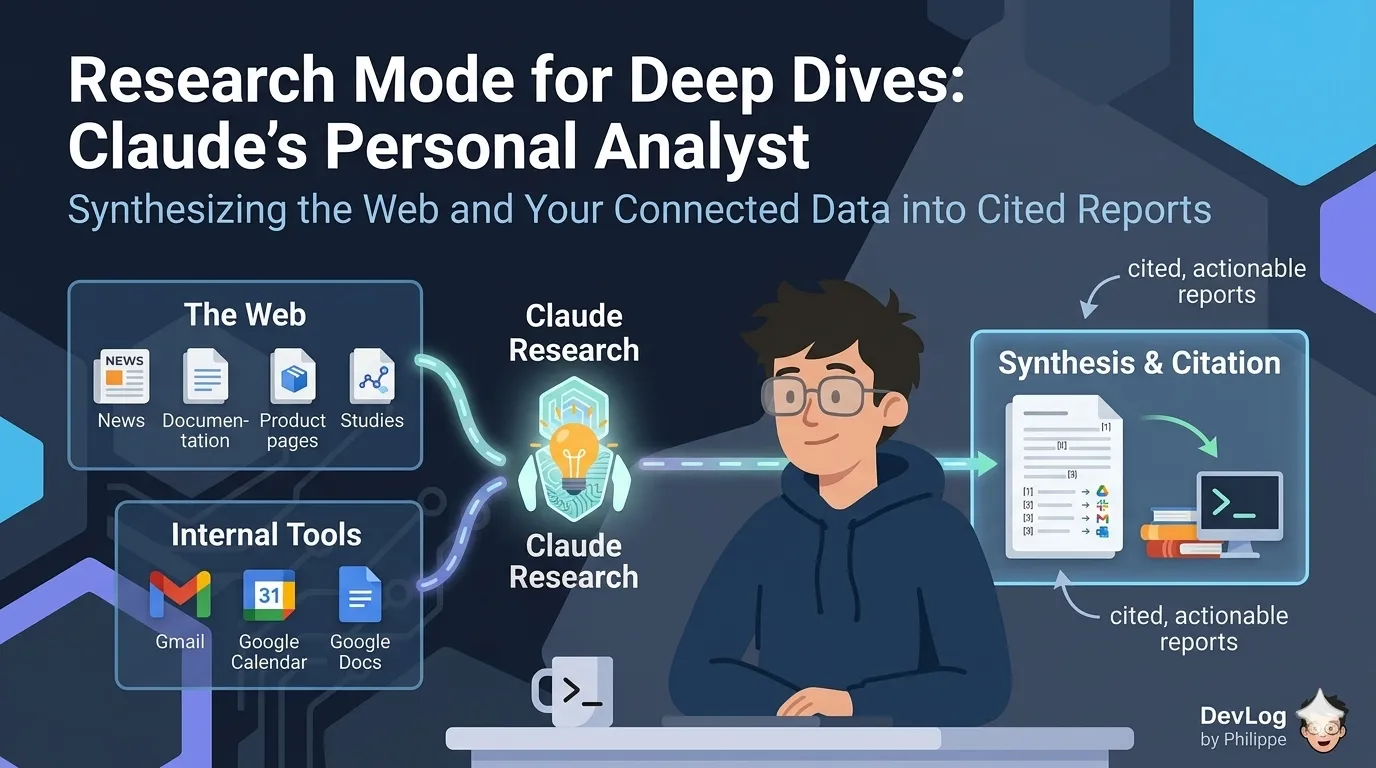
Next, Claude carries out the investigation. Claude will kick off the Research process across your internal context (such as Gmail, Google Calendar, and Google Docs when connected) and the web. This is where the layered-search behavior comes in: each search informs the next. If Claude finds something that opens a new line of inquiry, it pursues it. If a source is unclear, it cross-references against another. This happens without you needing to prompt at each step.
Finally, Claude synthesizes what it has found into a single response. Unlike a plain list of search results, the output is a composed answer that draws connections across sources and cites where each claim came from. Those citations matter: they let you spot-check anything that looks surprising, dig deeper into a source that caught your attention, and hand the report to a colleague who wants to verify the reasoning themselves.
The whole process typically runs in minutes rather than hours, depending on the complexity of the question and how much material needs to be gathered.
Turning Research On
Research lives alongside Claude’s other tools in the chat interface. Getting to it is straightforward: Find the “Research” button on the bottom left of your chat interface. If the button is white, Research is disabled. Click the “Research” button to enable the feature and turn the button blue. Click the button again to disable Research.
One important prerequisite: You must have web search turned on for Research to function. This makes sense — Research uses web search as one of its primary ways of gathering information, along with any integrations you have connected. If web search is off, Claude doesn’t have access to the open web, which is a big part of what makes Research useful.
Research is available for users with paid Claude plans (Pro, Max, Team, or Enterprise) using Claude on the web, Claude Desktop, or Claude Mobile. If you have one of those plans, the feature is ready to use — no admin setup required for individual users.
A note on usage: Research is subject to the same limits as standard Claude conversations. However, Research sessions can use up your limits faster due to Claude retrieving multiple sources and providing comprehensive responses. That’s worth keeping in mind — Research is the right tool when the depth is worth the cost, and not the right tool for quick lookups you could do with ordinary search.
What Research Can Draw On
The real power of Research shows up when you combine the web with your own connected tools.
On the web side, Research can pull from the same sources web search can — news, documentation, product pages, studies, industry reports, and so on. That alone is useful. But when you connect Claude to services like Gmail, Google Drive, and Google Calendar, Research becomes something closer to a personalized analyst. It can compare business competitors, update outdated internal documents with info from the web, help you prioritize or action items from your calendar and email, and more.
Consider what this enables in practice. You can ask Claude to look at your upcoming week of meetings, pull the relevant context from your email threads and shared docs, find what’s current on each topic on the web, and give you a prep brief. You can ask it to compare your internal pricing strategy (as documented in Drive and Gmail) to the public positioning of your three biggest competitors, and flag where you’re exposed. You can ask it to take an internal strategy doc that’s a year old and tell you what has changed in the outside world since it was written.
These aren’t prompts that fit neatly into a single search. They’re the kind of questions that used to require hours of manual work, and they’re exactly the kind of questions Research is designed to handle.
A useful framing from the documentation: when you want Research to lean on your connected tools, prompt it explicitly. In this case, you should steer and prompt Claude to “Pull relevant context from [relevant internal knowledge source].” Being specific about which sources matter helps Claude direct the investigation where you want it.
Writing Good Research Prompts
Because Research is doing a lot of work on your behalf, the quality of the prompt you give it has an outsized effect on the quality of what comes back. A vague prompt produces a vague report. A specific prompt produces something you can actually use.
A few practical guidelines.
Specify the goal, not just the topic. “Tell me about electric vehicle adoption in Europe” is a topic. “Help me build a one-page market brief comparing electric vehicle adoption in Germany, France, and the UK, focused on consumer affordability and charging infrastructure” is a goal. Claude can do more with the second version because it knows what shape the answer should take.
Define the structure you want. If you need a report organized a particular way — sections, headings, specific comparisons — say so upfront. It’s faster than reorganizing the output afterward and it lets Claude plan the investigation around the structure you need.
Include constraints. Budget ranges, geographic scope, time windows, company size, audience — anything that narrows the space Claude is searching makes the output more relevant. “Vendors suitable for a small team” and “enterprise-grade vendors” point in very different directions.
Ask Claude to refine the prompt. If you’re not sure what details will help, you can ask Claude to propose a more detailed version of your prompt before you run the Research. This is a surprisingly useful step — it surfaces assumptions you hadn’t thought to specify and lets you correct course before Claude spends time on the wrong path.
Reading the Output
Research reports come with citations for every claim, and it’s worth actually using them. Not because Claude is unreliable — the citations exist precisely so you can trust the answer — but because the citations are often the most useful part of the report.
When you spot a claim that surprises you, click through to the source. When a section feels thin, check what it’s based on. When you want to go deeper on one part of a topic, the citations are your starting points for follow-up reading.
This is also how Research reports become shareable work. A claim without a source is just an assertion. A claim with a citation is evidence a colleague can evaluate on its own terms. If you’re using Research to prepare a briefing for others, the citations give your findings the kind of traceability that professional work requires.
A Practical Example
Imagine you’re preparing for a quarterly strategy meeting. You want to walk in with a clear view of how three key competitors are positioning themselves, what’s changed in your industry in the last quarter, and what your own team has been working on that’s relevant to the conversation.
Without Research, this is an afternoon: competitor websites, news searches, skimming your Drive for the latest product roadmaps, pulling relevant threads from Gmail, then stitching it all together into something presentable.
With Research, it’s a single prompt: “Prepare a strategy meeting brief. Use Research to compare how [Competitor A], [Competitor B], and [Competitor C] have been positioning themselves over the last 90 days based on their public announcements, press coverage, and blog posts. Pull relevant context from my Google Drive about our product roadmap for the same period and from my Gmail about recent customer conversations. Organize the brief into three sections: competitive landscape, internal updates, and a short synthesis of where we’re aligned and where we’re exposed. Cite all claims.”
Claude plans the investigation, runs the searches across both the web and your connected tools, synthesizes the findings, and gives you a cited report. You read it, spot-check the citations, edit where you want to sharpen the framing, and walk into the meeting with real material.
That shift — from I need to go find all of this to I need to review and refine what Claude found — is the practical value of Research. It doesn’t replace your judgment. It compresses the time between having a question and being in a position to act on it.
Looking Ahead
Research represents something broader about where Claude is going. For straightforward questions, a single response is enough. But real work — the kind that spans tools, sources, and days — requires something more. Research is one of the clearest examples of Claude working agentically on your behalf: taking a goal, planning an approach, and carrying it out over multiple steps so you can focus on the thinking only you can do.
As you start using Research, a few habits will serve you well. Reach for it when the question is genuinely multi-source. Write prompts that specify the goal and the shape of the answer you want. Use the citations. And pay attention to which questions are best answered by Research, which by extended thinking, and which by a quick web search — that sense develops with use, and it’s one of the things that makes working with Claude feel less like using a tool and more like working with a capable collaborator.
Further Reading
- Using Research on Claude — Research feature that conducts iterative multi-source searches with citations for comprehensive answers
- When should I use web search, extended thinking, and Research? — Guidance on selecting between web search, extended thinking, and Research for different types of tasks
- Enabling and using web search — How to enable real-time internet access for current, cited responses including direct links and image search
- Using extended thinking — How to enable extended thinking mode for complex problem analysis, including activation steps and optimal use cases