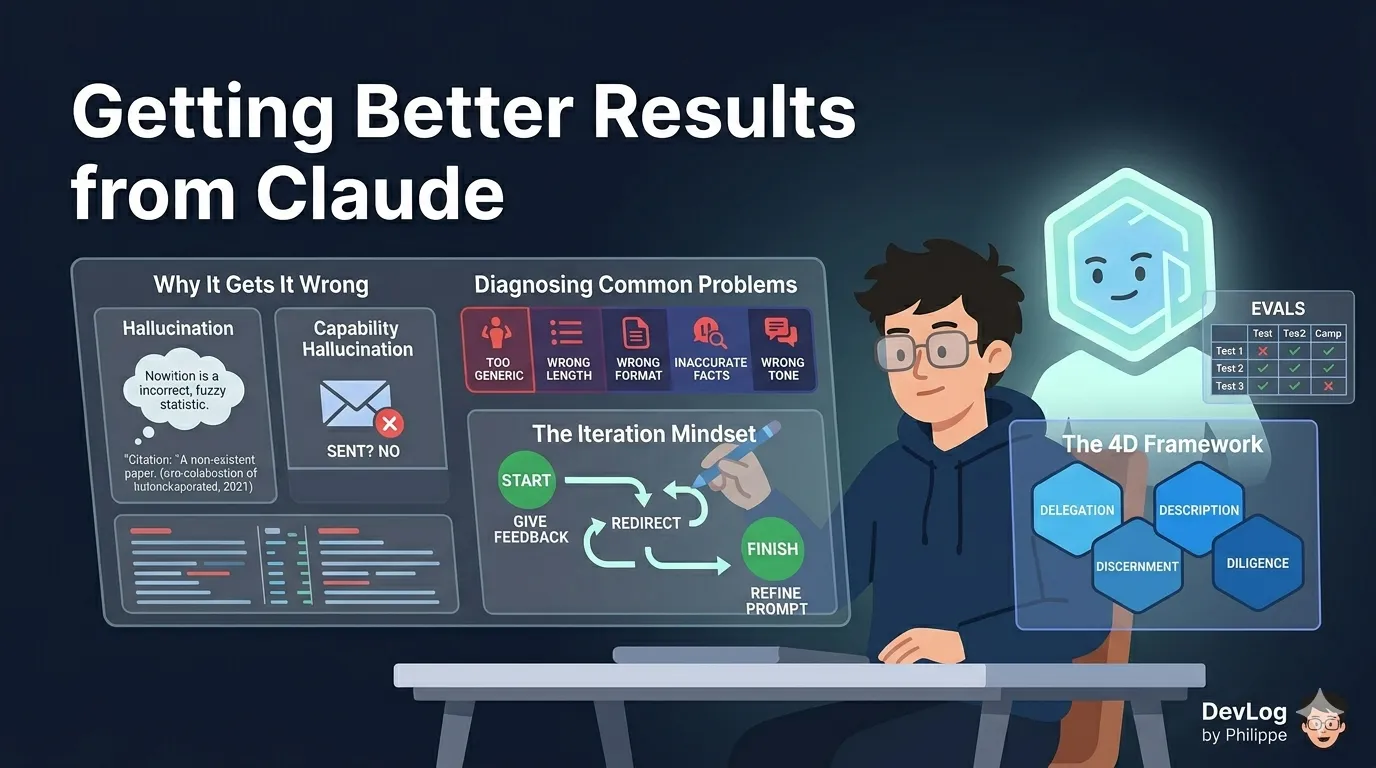
There is a gap between using Claude and using Claude well. Most people who start with an AI assistant follow the same arc: their first few conversations feel promising, then they hit a response that misses the mark — too vague, too long, wrong tone, or simply wrong — and they are not sure what to do next. This lesson is about closing that gap.
Getting better results is not a matter of luck or clever tricks. It comes down to three things: understanding why Claude sometimes gets things wrong, building the habit of iteration, and developing a principled approach to working with AI over time. Together, these form the foundation of what we might call AI fluency — the ability to work with AI tools efficiently, effectively, and with appropriate judgment.
Why Claude Sometimes Gets It Wrong
Before you can fix a problem, it helps to understand where it comes from. Claude’s limitations tend to fall into two categories: limitations of knowledge, and limitations of capability.
Hallucination: When Claude Invents Information
Claude is a large language model — a system trained on enormous amounts of text to predict what a useful, accurate response looks like. One consequence of this training approach is that Claude can sometimes produce responses that sound confident and coherent but are factually incorrect. In the field of AI, this is called hallucination.
Hallucination is not a bug that will be patched in the next software update. It is an inherent characteristic of how current language models work. Claude may not have been trained on the most up-to-date information in a given subject area, or it may construct plausible-sounding details that do not actually exist — a citation to a paper that was never written, a statistic that cannot be verified, a date that is off by a year.
This does not mean Claude is unreliable for everyday work. For tasks like drafting, summarizing, brainstorming, restructuring arguments, or working through ambiguous problems, hallucination is rarely a significant issue. The risk increases when you need precise factual accuracy — historical dates, legal statutes, scientific data — so calibrate your verification habits accordingly.
Capability Hallucination: When Claude Claims to Do Things It Cannot
A related but distinct issue arises around Claude’s capabilities. In an attempt to be helpful, Claude can sometimes claim to have done something it has not — sent an email, saved a file to your desktop, produced a document in an external application. Unless a specific tool is explicitly integrated with your version of Claude, it does not have access to outside software or services.
If you see Claude claiming to have performed an action that seems beyond the current conversation — especially something involving external systems — treat it with skepticism. Claude is not being deceptive; it is generating what a helpful response would look like if it had those capabilities, even when it does not.
The practical lesson: when you need Claude to interact with external tools, use the integrations that are explicitly available to you (connectors, the Claude for Excel add-in, Claude in Chrome, and so on). Don’t assume capability unless you can verify it.
The Context Window: What Claude Can and Cannot Remember
Claude does not have persistent memory by default. Each conversation starts fresh — Claude has no awareness of what you discussed last week, what preferences you have expressed in past chats, or what files you have shared before.
Within a single conversation, Claude’s working memory is defined by its context window: the total amount of text it can hold and reason about at once. Claude’s context window is 200,000 tokens across all models and standard paid plans (roughly 500 pages of text), which is large enough for most professional tasks. But it is not unlimited, and it resets when you close a conversation.
For paid plan users, Claude now includes a memory feature that partially addresses this limitation. When enabled, Claude automatically summarizes your conversations and builds a synthesis of key insights across your chat history, updating it every 24 hours. This memory carries into future standalone conversations, so Claude can build understanding of your preferences and work over time. You can also tell Claude directly what you want it to remember, and it will update its memory immediately — no need to wait for the next daily refresh.
Paid users also have access to chat search, which lets you prompt Claude to find and reference information from previous conversations. Rather than re-explaining your project setup from scratch in every new chat, you can ask Claude to pull up relevant context from earlier sessions.
Both features can be toggled on or off in Settings > Capabilities.
Diagnosing Common Problems
When a response misses the mark, the cause is almost always traceable to something in how the prompt was constructed. Here are the five most common failure patterns and their fixes.
The Response Is Too Generic
What it looks like: Claude gives you a technically correct answer that feels like it could have been written for anyone — full of safe generalities, light on specifics, and not particularly useful for your situation.
Why it happens: Without sufficient context, Claude defaults to a broad interpretation of your request. It has no way to know who you are, what you already know, what you are trying to accomplish, or what constraints apply.
The fix: Add three pieces of context before making your request:
- Your role or perspective (“I am a marketing manager preparing a brief for a non-technical executive audience”)
- Your objective (“I need to explain why we should increase our content budget”)
- Relevant constraints (“Keep it to three main points, no jargon”)
The more specifically Claude understands your situation, the more targeted the response will be.
The Response Is the Wrong Length
What it looks like: Claude either writes a dense 800-word essay when you wanted a quick summary, or gives you three bullet points when you needed a comprehensive analysis.
Why it happens: Claude infers the appropriate length from context clues in your prompt. Without clear signals, it makes a judgment call — and it may guess differently than you intended.
The fix: Be explicit. “Under 100 words” and “comprehensive overview, at least 400 words” are both perfectly reasonable instructions. You can also specify format: “three short paragraphs,” “a bulleted list of no more than five items,” “an executive summary followed by three supporting sections.”
The Response Is in the Wrong Format
What it looks like: Claude writes flowing prose when you wanted a table, or returns a numbered list when you needed a narrative.
Why it happens: Same as length — Claude is inferring what format fits the request, and it may not match what you had in mind.
The fix: Either describe the structure explicitly or show Claude an example. Saying “format this as a two-column table with Pros on the left and Cons on the right” leaves little room for ambiguity. If you have an existing template, paste it in and ask Claude to follow it.
The Response Contains Inaccurate Facts
What it looks like: Claude states something confidently that is incorrect, outdated, or unverifiable.
Why it happens: Hallucination, as discussed above. Claude’s training data has a cutoff date, and its probabilistic nature means it can generate plausible-sounding but incorrect information.
The fix: For high-stakes factual work, build verification into your workflow. Ask Claude to “cite your sources” or “flag anything you are not certain about.” Use web search (when enabled) to ground responses in current information. And for anything you plan to publish, share with clients, or use to make decisions, verify key facts independently.
The Tone Is Wrong
What it looks like: The response sounds too formal, too casual, too academic, too corporate — whatever the wrong direction is for your context.
Why it happens: Tone is subjective and context-dependent. Without explicit guidance, Claude defaults to a register it infers from the prompt — which may not match your needs or your audience.
The fix: Describe the tone in plain language (“more conversational, less corporate”), and if possible, provide a writing sample. You can paste in an example of your own writing and say “match this style.” You can also save a preferred communication style in Claude’s settings under Styles, so it applies consistently without you having to specify it each time.
The Iteration Mindset
Knowing how to diagnose a poor response is only half the skill. The other half is what you do next.
The most important shift in mindset for effective AI use is this: treat the first response as a starting point, not a final answer. Claude is not a vending machine that delivers a result on the first push of a button. It is a collaborator in a back-and-forth process. The quality of the outcome improves with each exchange — as Claude better understands what you need, and as you better understand how to ask for it.
In practice, iteration looks like this:
Give specific feedback. Vague redirection (“make it better”) is less useful than targeted feedback (“the second paragraph is too technical for this audience — simplify it”). The more specific your feedback, the more direct the improvement.
Redirect when needed. If Claude misunderstood the request entirely, say so plainly: “I was asking about X, not Y. Let me restate the question.” There is no penalty for correcting course mid-conversation.
Know when to start a new chat. Within a single conversation, Claude carries the full context of everything said before — which is useful when you are iterating, but can become a liability if the conversation has gone in a direction that is now actively working against you. If you find that earlier misunderstandings are coloring new responses, starting fresh is often faster than trying to course-correct in place.
The real value of this iterative approach compounds over time. The more you work with Claude — giving it feedback, refining your prompts, building shared context through memory and projects — the more useful it becomes. This is not a tool that rewards occasional use. It rewards consistent engagement.
The 4D Framework: A Map for AI Fluency
For professionals who want to move beyond instinct and develop a more systematic approach to working with Claude, a useful organizing framework is the four Ds:
Delegation — knowing which tasks are appropriate to hand off to Claude. Not everything benefits from AI involvement. Delegation is about identifying where Claude adds genuine value (synthesizing information, drafting at scale, exploring options quickly) versus where human judgment is irreplaceable (final decisions, nuanced relationship management, ethical calls).
Description — the skill of communicating clearly and precisely in prompts. This is prompt craft: providing the right context, the right constraints, the right examples. Good description is the most directly learnable skill in AI fluency, and it pays dividends in every interaction.
Discernment — the ability to evaluate Claude’s output critically. Not accepting everything at face value; not rejecting it reflexively. Discernment means asking whether the response is accurate, appropriate, and complete — and knowing what to do when it falls short.
Diligence — the ongoing commitment to verify, iterate, and take responsibility for outputs. Claude is a powerful collaborator, but the human using it remains accountable for what gets done with the results. Diligence is the discipline that ensures AI assistance stays on the right side of responsible use.
These four competencies are not technical skills — they require no coding knowledge or AI expertise. They are habits of working, and they are learnable.
Evaluating Claude’s Performance on Your Work
For professionals who rely on Claude for recurring tasks — drafting weekly reports, answering support questions, summarizing research — it is worth taking a more systematic approach to understanding how well Claude performs on your specific work. This is what practitioners call running evals (short for evaluations).
The goal is not to run a formal scientific study. A simple approach works well for most professional contexts:
- Gather examples. Collect five to ten real examples of the type of task you need Claude to handle — ideally including a few where you know what a good output looks like.
- Create test prompts. Write the prompts you would actually use, and run them against your examples.
- Compare outputs. Review the results against what you expected. Where does Claude do well? Where does it fall short? Are the failures consistent (always wrong in the same way) or unpredictable?
- Refine your prompts. Based on what you observe, adjust your prompt — add context, tighten constraints, clarify the format — and test again.
This process does not need to take long. Even an informal pass through five examples can reveal patterns that help you write consistently better prompts. The investment pays off quickly when the task is one you do repeatedly.
A Final Word on Patience and Practice
Working effectively with Claude is a skill, and like most skills, it improves with practice. The professionals who get the most out of AI tools are not necessarily the ones with the most technical background — they are the ones who have put in the time to understand where the tool excels, where it falls short, and how to steer it toward consistently useful output.
Every frustrating response is feedback. Every iteration is progress. The goal is not perfection on the first try — it is a working relationship that gets better over time.
Further Reading
- Claude is providing incorrect or misleading responses. What’s going on? — Explanation of hallucination behavior and how to verify responses
- Claude is producing links that don’t work and falsely claiming that it has sent emails or produced external documents. What’s going on? — Why Claude sometimes incorrectly claims capabilities beyond its integrated tools
- Use Claude’s chat search and memory to build on previous context — Chat search across previous conversations and memory summarization to maintain context
- Troubleshoot Claude error messages — Guidance on resolving common errors including usage limits, login issues, and capacity constraints
- Adapting to new model personas after deprecations — Strategies for transitioning to new Claude models using memory, styles, and projects