Learning how Claude works is one thing. Learning what to actually do with it — on Monday morning, at your desk, with the work that’s actually on your plate — is another. Up to this point in the course, we’ve covered the building blocks: what Claude is, how to prompt it well, how to organize your work in Projects, how to automate with Skills, and how to connect Claude to the tools you already use. This lesson is about putting those building blocks to work.
The way to get real value out of Claude is to stop thinking of it as a generic “AI assistant” and start thinking of it as a colleague who can take on specific, concrete tasks in your function. A salesperson uses Claude differently than a marketer. A finance analyst uses it differently than an HR lead. The fundamentals are the same — clear prompts, relevant context, iteration — but the workflows look very different depending on the role.
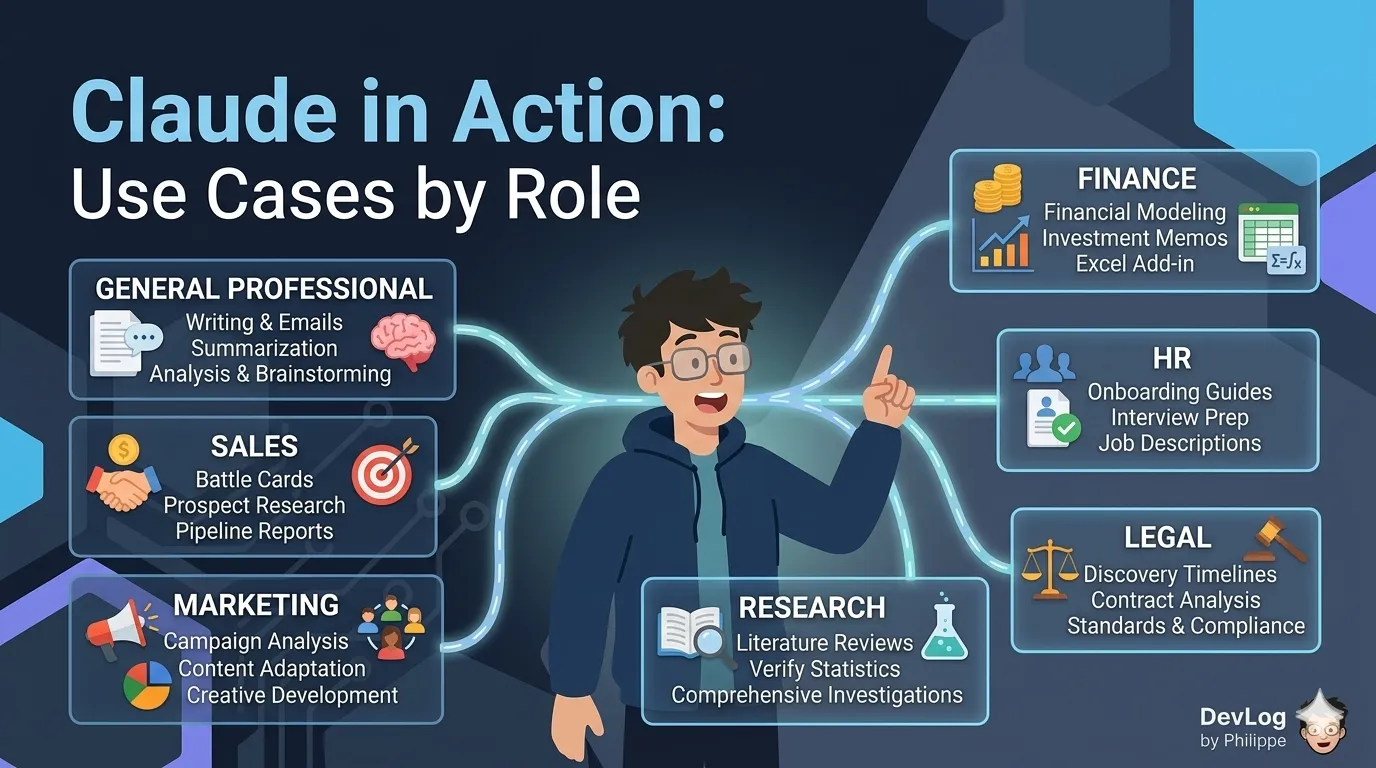
This post walks through practical use cases across seven common functions: general professional work, sales, marketing, finance, HR, legal, and research. For each, you’ll find the kinds of tasks Claude handles well, the Claude features that tend to matter most, and the context you’ll want to bring into the conversation to get good results.
The Foundation: General Professional Use Cases
Before getting into role-specific work, it’s worth starting with the tasks almost every knowledge worker runs into regardless of function. These are the everyday uses of Claude that, once they become habit, quietly compound across your week.
Writing across formats. Claude can help you draft nearly any written artifact you produce at work — emails, status updates, meeting agendas, memos, proposals, announcements, blog posts, internal wikis. Drafting is where many people get their fastest wins, because the marginal effort of going from a blank page to a rough first draft shrinks dramatically.
Summarization. Hand Claude a long document — a lengthy article, a dense report, a transcript, even a book-length file — and it can produce a concise summary that captures the key points. This is especially useful when you need to get up to speed quickly on material you haven’t had time to read in full.
Analysis and brainstorming. Claude is effective as a thinking partner: bouncing ideas off of, generating viewpoints you hadn’t considered, stress-testing arguments, and recommending options. It’s not going to replace domain expertise, but it can accelerate the early stages of almost any analytical task.
Project status reports, feedback analysis, brand guidelines as Skills. A few concrete patterns stand out as broadly useful across roles. You can have Claude read through a backlog of customer feedback and surface common themes. You can ask it to synthesize project updates from across multiple documents into a single status report. And you can package your company’s brand guidelines — voice, tone, visual identity, writing standards — as a Skill that Claude automatically applies every time you create external-facing materials.
That last pattern is worth pausing on. A Skill is a folder of instructions and resources that Claude loads on demand when relevant. Packaging your brand guidelines as a Skill means Claude can automatically apply them to presentations, documents, and marketing materials without you having to re-explain your standards every time. Think of it as teaching Claude your organization’s voice once, then benefiting from that consistency forever after.
Sales
Sales work is a mix of deep preparation, fast execution, and constant context-switching between deals, accounts, and stakeholders. Claude fits naturally into several of these rhythms.
Battle card libraries. A battle card is a one-page reference for selling against a competitor — their strengths, weaknesses, common objections, and the counter-positioning that tends to work. Building and maintaining a library of battle cards is one of those “we should really do this” projects that never quite gets done. With Claude, you can upload competitor materials (their website content, analyst reports, product documentation, press coverage) and have Claude synthesize them into structured battle cards. More importantly, you can create a dedicated Project for your competitive intelligence work, keep the source materials in the project’s knowledge base, and have a single place where Claude can answer questions like “how do we position against Competitor X for mid-market healthcare buyers?”
Deal preparation and prospect research. Before an important call, you want to know the prospect’s business, their recent news, the people in the room, and the likely pain points. Claude’s Research mode is built for exactly this kind of multi-source investigation. It can run a series of connected searches across the web, pull in relevant context from your connected tools, and deliver a cited briefing in a few minutes — the kind of prep work that might otherwise take an hour.
Pipeline reports and summaries. If your CRM or sales tools are connected via a connector, Claude can help summarize pipeline health, flag stalled deals, and draft internal updates for your manager or leadership team. For tools that aren’t directly connected, you can export data, upload it to Claude, and ask for the same analysis.
Marketing
Marketing is one of the richest areas for Claude because so much of the work is language-heavy: writing, adapting, brainstorming, repositioning.
Campaign performance analysis. Upload campaign data — conversion metrics, channel breakdowns, engagement numbers — and ask Claude to help you find what’s working and what isn’t. You’ll often want to pair the data with context about your goals, audience, and recent changes so that Claude can make sense of the numbers rather than just describe them.
Content adaptation across platforms and audiences. One of Claude’s most practical marketing uses is adapting a single piece of content for different channels. You can write one long-form blog post and ask Claude to produce a LinkedIn version, a Twitter thread, an email newsletter variant, and a 30-second video script — each appropriate for its platform. You can also shift voice and framing for different audiences, such as a technical buyer versus a business buyer.
Brainstorming and creative development. Campaign ideas, tagline options, content calendars, positioning statements — Claude is a useful starting partner for all of these. The trick is to give it real constraints (audience, goals, brand voice, things you’ve already tried) rather than open-ended prompts, so you get ideas that are relevant rather than generic.
Packaging marketing standards as Skills. As with brand guidelines, you can package your messaging frameworks, product positioning, or campaign templates into custom Skills. The official documentation describes Skills that can combine research frameworks, competitive benchmarks, and regulatory context into market evaluations, or pull financial data and operational metrics into a standard board presentation format. The point is that recurring marketing work with specific standards is an ideal candidate for Skills.
Finance
Finance is where some of Claude’s most specialized capabilities come into play, because financial work depends so heavily on spreadsheets, structured documents, and rigorous formatting.
Financial modeling and formula debugging. Claude for Excel is an add-in that integrates Claude directly into your Excel workflow, designed especially for financial analysis and modeling. With it installed, you can ask questions about specific cells, formulas, or entire workbook tabs — Claude navigates across multiple tabs and provides answers with direct citations to the cells it referenced. It can build initial versions of financial models, help structure complex calculations, and review existing models to identify formula errors. Importantly, Claude highlights the changes it makes to your workbook, so you always have visibility into what was edited.
Investment memos and committee documentation. Drafting investment memos, due diligence reports, and committee presentations is a natural fit for Claude. You can point it at your source materials — confidential information memorandums, data room documents, 10-Ks, management presentations — and have it produce structured first drafts that follow your firm’s templates. The official guidance recommends using Projects to organize these workflows: keep all the source materials for a deal in a single project knowledge base, and Claude can reference them consistently across multiple conversations.
Inheriting and extending spreadsheets. One of the most time-consuming parts of finance work is making sense of a model someone else built. Claude can read through an inherited workbook, explain what each section does, flag assumptions, and help you extend it in a way that’s consistent with the original structure.
Financial data integrations. For organizations with access to specialized financial data providers, Claude can connect directly through integrations that supply fundamentals, filings, earnings transcripts, and market data. This turns Claude into a research analyst that can pull real numbers, rather than relying on what’s already in your documents.
HR
HR teams have a specific mix of repeatable processes and sensitive, context-heavy work that benefits from AI support.
Role-specific onboarding guides. Creating a tailored onboarding guide for each new hire — with their team’s norms, their first-30-days priorities, and the systems they’ll actually use — is the kind of task that makes a real difference to the new hire but rarely gets the time it deserves. With Claude, you can build a Project that holds your general onboarding materials (handbook, benefits info, policies, org charts), then generate role-specific versions on demand. A new engineer gets one version; a new account executive gets another.
Policy and process documentation. Writing, updating, and clarifying internal policies is another natural fit. Claude can help draft new policies in your organization’s voice, synthesize existing documentation into plain-language FAQs, and flag inconsistencies across documents.
Interview prep and job descriptions. Claude can help write job descriptions, draft interview questions aligned with a competency model, and prepare interviewers with relevant context on a candidate.
Legal
Legal work is document-heavy, precedent-driven, and detail-sensitive — all areas where Claude can meaningfully accelerate the parts of the work that don’t require a licensed attorney’s judgment.
Discovery timelines and pattern analysis. Given a set of case documents, Claude can help build chronological timelines, identify key events, and flag patterns that might be relevant across documents. For a discovery set that would take a junior associate days to read through, Claude can offer a first pass in much less time — one that the attorney can then verify and build on.
Contract analysis. Claude can read contracts and highlight key terms, unusual clauses, or differences from a standard template. The official documentation notes that Claude is effective at analyzing contracts and business documents to identify key terms, metrics, and potential risks.
Standardizing legal work with Skills. Recurring legal work often has structure: standard contract reviews, NDAs, employment agreements, regulatory filings. Packaging the review checklists, clause libraries, and regulatory requirements into a custom Skill means Claude can apply consistent standards automatically whenever you ask for that type of review.
Research
Research work spans academic settings, competitive intelligence, policy work, product research, and more. It benefits especially from Claude’s ability to read widely, synthesize across sources, and hold a lot of context at once.
Literature reviews and planning. Claude is an effective partner for planning a literature review — scoping the question, identifying the subfields to cover, and suggesting the types of sources to include. You can upload papers as you find them, and Claude can help you organize findings, identify contradictions across sources, and draft synthesis sections by theme.
Verifying statistics from raw data. One of the more practical research uses is verification: asking Claude to check that the numbers in a summary match the raw data, or to recompute a statistic from a primary source. This is the kind of careful work that’s easy to skip under time pressure but catches errors before they make it into a published report.
Research mode for comprehensive investigation. For questions that need a comprehensive cited answer rather than a quick lookup, Claude’s Research mode runs multiple layered searches across the web and your connected integrations, then synthesizes the findings into a report with citations. It’s particularly useful for competitive analysis, multi-source comparisons, and any investigation that would take hours to do manually.
Where These Use Cases Come Together
One theme running through all seven roles is that the most valuable work with Claude isn’t one-off prompting — it’s building up reusable infrastructure that makes each future task easier.
A Project holds your source materials, custom instructions, and accumulated chat history for recurring work. A Skill packages a workflow — a set of instructions, templates, and standards — so Claude handles it consistently every time. A connector links Claude to your actual work data in Gmail, Google Drive, your CRM, or your project management tool. Used together, these features turn Claude from a helpful chat window into something closer to a team member who knows your work.
The examples in this post are not exhaustive. Anthropic maintains a broader library of use cases with step-by-step walkthroughs for specific scenarios; you can find it at claude.com/resources/use-cases. The best way to use this post is as a starting map: pick one or two use cases that match your role, try them this week, and iterate from there.
Looking Ahead
The goal of this lesson was to make Claude concrete — to move from “here’s what Claude can do” to “here’s what Claude can do for people in your role, with the kind of work actually sitting on your desk.” In the next and final lesson, we’ll look at the broader Claude product family: Claude Code for developers, Claude in Slack for team communication, Claude for Excel and PowerPoint for Office workflows, and Claude in Chrome for browser-based work. The right product for a given task can save you a lot of friction, and knowing the landscape helps you choose where to do the work.
Further Reading
- What are some things I can use Claude for? — Overview of Claude’s broad use cases including writing, coding, research, summarization, translation, and brainstorming
- Examples of projects you can create — Practical project implementations including research organization, product development, and content creation
- Use Claude for Excel — Claude for Excel add-in for AI-powered financial modeling, data analysis, formula debugging, and spreadsheet editing
- Work across Excel, PowerPoint, and Word — How Claude coordinates context across the Office add-ins so work in one app informs work in another
- Claude for Financial Services Overview — How Claude serves financial professionals with AI assistance for research, analysis, and document creation tasks
- Install financial services plugins for Cowork — Installing open-source financial plugins for financial modeling, equity research, and investment banking analysis
- Use plugins in Cowork — Installing and using pre-configured plugin packages that bundle skills, connectors, and sub-agents
- Assign tasks to Claude from anywhere in Cowork — Cowork Dispatch for delegating tasks that run asynchronously with access to local files